For golfers with a launch monitor
You bought the launch monitor.
Now put those numbers to work.
You’ve got thousands of shots logged—ball speed, carry, dispersion, the works. But the data lives in its own app, and it never quite touches the game you actually play. GolfSalt brings it into the rest of your game.
The numbers are great. The problem is what happens next.
A launch monitor is a brilliant measuring tool. But measuring isn’t coaching—and a spreadsheet of carry distances doesn’t know a thing about your Saturday round.
Data Stuck in a Silo
Every session gets saved, and then it just… sits there. Session after session piling up in an app that never connects the dots between them—or to anything else you do on the course.
Numbers Without Meaning
Your 7-iron carries 158. Is that good? Should you worry about the spin? What do you actually work on? The device tells you what happened. It was never built to tell you what to do about it.
Disconnected From Your Game
You striped it on the range, then lost strokes around the green on Sunday. Your monitor doesn’t know that. It can’t see your rounds, your gaps, or your goals—so the practice never lines up with the game.
What if your data actually
joined the rest of your game?
Bring It In, No Retyping
Export the file your device already makes and drop it in. GolfSalt auto-detects most common launch monitor and simulator formats—club speed, ball speed, carry, total distance—whatever your device measures.
Works with the gear you already own.
Your Coach Reads the Numbers
Your coach doesn’t just store the data—it studies it. Distance gaps between clubs, dispersion patterns, the trends across sessions. It knows what your numbers mean because it knows the rest of your game.
Answers, not just averages.
Turned Into What to Do Next
Range data meets your rounds, your goals, and your bag. The result is a practice plan built around what your shots actually reveal—and a coach you can just ask, “what should I work on this week?”
From data to a plan you can hit.
Three steps to make it count
Export
Save the session file your launch monitor or simulator already produces. No new hardware, no new habits.
Import
Drop it into GolfSalt. The format gets detected automatically and your shots land in your practice history.
Coach
Your coach ties the numbers to your rounds and goals, then tells you exactly what to work on—whenever you ask.
What your coach actually does with your data
- Spots the real gaps in your bag—the clubs that carry too close together, and the distances you don’t cover
- Connects range consistency to where you’re actually losing strokes on the course
- Builds practice plans around what your shots reveal—not generic drills
- Remembers every session, so it can show you whether last month’s work is holding up
- Looks at simple fixes—setup, gapping, the shot you rely on—before ever suggesting you spend a dollar on gear
One example
See the holes in your bag
Distance Gaps lines up every club’s smart carry range on a single axis, built straight from your imported shots. In seconds you can spot the gaps that are too wide—like the 95-yard hole between this bag’s hybrid and driver—and the clubs stacked so close they’re doing the same job. That’s a pile of numbers turned into a decision about what your bag actually needs.
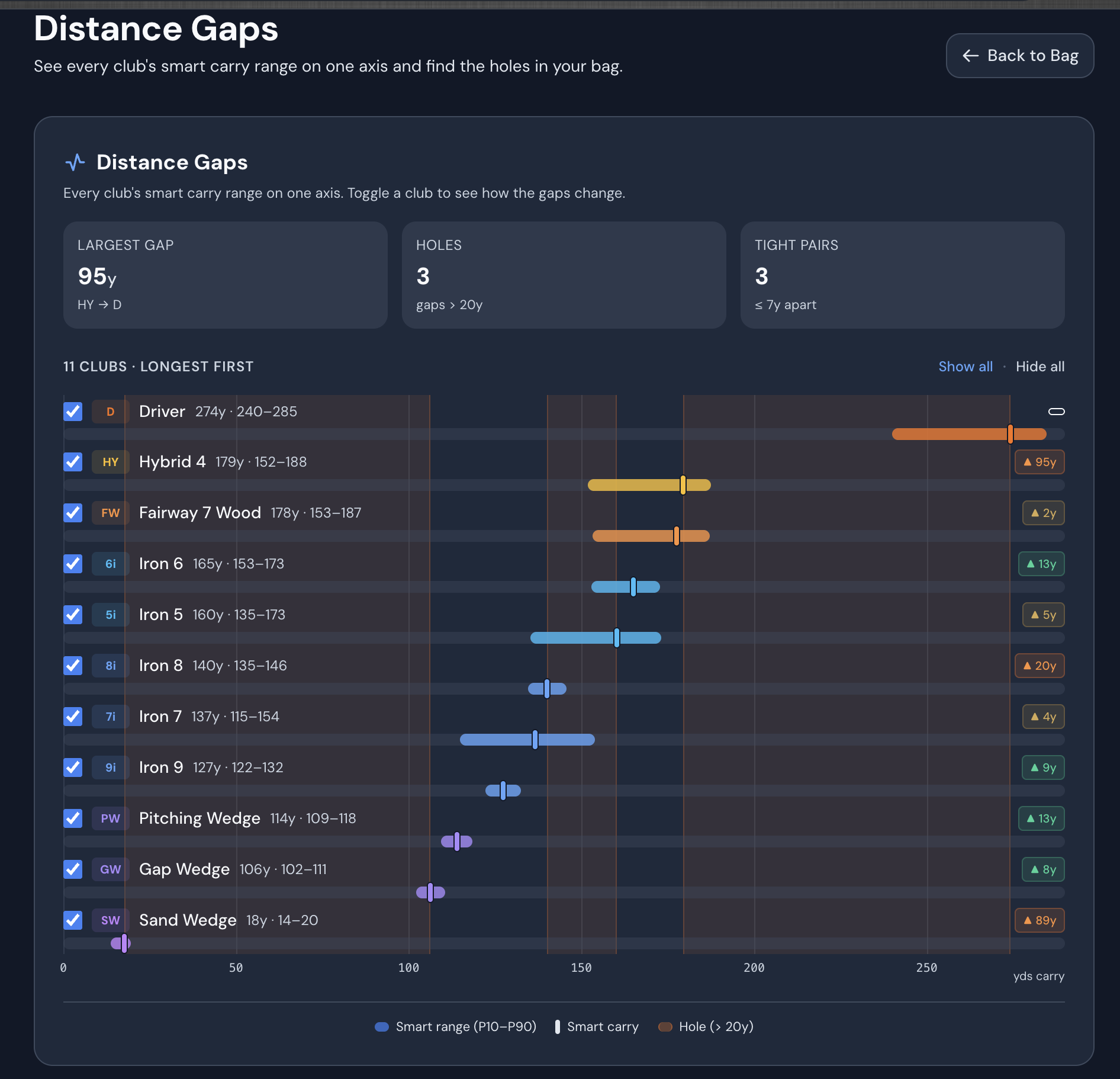
Example bag — your own view is built from the shots you import.
You already made the investment. Our job isn’t to sell you the next gadget—it’s to help you get everything out of the one you’ve got, and fold it into a game plan that’s actually yours.
The Golf Salt Team
Questions golfers ask about their data
Straight answers to what people actually want to know about making launch monitor data useful.
What should I do with my launch monitor data?
The most useful thing you can do with launch monitor data is connect it to the rest of your game. On its own a launch monitor tells you what happened — carry distances, ball speed, dispersion — but not what to work on. GolfSalt imports that shot data and pairs it with your rounds, your bag, and your goals, so your coach can find your real distance gaps and turn the numbers into a specific practice plan. Start at golfsalt.ai/launch-monitor-data.
How do I make sense of all my golf data?
Golf data becomes useful when something connects it. Launch monitor sessions, round scores, and practice logs each tell part of the story, but the insight comes from relating them — does the range work actually show up on the course? GolfSalt is a golf coach that brings these sources together and explains them in plain language, flagging patterns like inconsistent clubs, gaps between your distances, and where you are really losing strokes.
Is there an app that turns launch monitor data into a practice plan?
Yes. GolfSalt imports launch monitor and simulator data and uses it to build a personalized practice plan. It reads your shot patterns and distance gaps, combines them with your rounds and goals, and recommends specific drills to work on — then updates the plan as you log more sessions.
What launch monitors and simulators does GolfSalt work with?
GolfSalt auto-detects the most common launch monitor and simulator export formats, so in most cases you export the file your device already creates and drop it in — no manual retyping. It reads the standard metrics like club speed, ball speed, carry, and total distance, and is brand-agnostic about which device you own.
Do I need to buy new equipment to make use of my launch monitor data?
No. GolfSalt works with the launch monitor and clubs you already own. When it looks at your data it prioritizes simple fixes — gapping, setup, and the shots you rely on — before ever suggesting a purchase, because new gear is rarely the answer to most problems.
How much does GolfSalt cost?
GolfSalt is $50/month for founding members, with no ad-supported free tier, and you can cancel anytime. It is priced against the cost of a single in-person lesson, except your coach is available whenever you need it and remembers every session you have ever logged.
Give your numbers a purpose
Bring your launch monitor data into a coach that connects it to your whole game.
Create your account in under a minute, then import your first session. Your coach takes it from there.
Get StartedAlready have an account? Sign in
© 2026 GolfSaltAI. Comprehensive golf coaching.
