A simulator is honest about some things and quietly generous about others. Here is how to use the bay for what it teaches well, close the gaps it can't, and decide when an hour indoors beats a round outside.
- Your simulator is excellent at some things and blind to others. Start line, face-to-path, full-swing carry gaps, speed and routine transfer well. Sloping lies, turf, real greens, wind and fatigue don't exist indoors, so you take those outside.
- Mats and indoor settings flatter your numbers. In TrackMan's own mat-versus-grass test, the same 7-iron launched 2.7° higher and spun about 1,900 rpm less off the mat. Treat indoor carry as a starting estimate, not a yardage book.
- The screen can turn into a crutch. Feedback after every shot helps while you practise and can hurt what you keep. Hide the numbers some of the time, and predict before you look.
- Practise like the course plays. One ball, a new club and target each time, your full routine, and no mulligans, gimmes or auto-putt. That turns a hitting session into practice that transfers.
- A simulator round is not the same as simulator practice. A round is fun and good for decision-making, but you hit each kind of shot only a few times. Use rounds to test and focused sessions to build.
Why simulator practice deserves its own plan
Indoor golf is no longer a winter fallback. The National Golf Foundation counts 8.1 million Americans who used a golf simulator or screen-golf venue in 2024, up from 3.8 million in 2015. In its survey, 43% of simulator users named better practice as a reason they use one.[1] In 2025, NGF estimated that 19 million Americans played golf only off-course, alongside 29.1 million on-course golfers.[2]
Many of those swings never become shots on a real course, and that is the problem this guide tackles. Most golfers who practise indoors know the feeling of the swing that looks great on the screen in February and leaves in April. TrackMan's own coaching blog tells the story of a player who fixed a 30-year slice indoors, only to see it come back on the first tee because his alignment habits never changed.[3] The swing improved; the way he played golf did not.
The simulator didn't fail him. He practised for the screen instead of for the course. The rest of this article is about the difference.
In motor learning, transfer means a skill you practised in one setting shows up in a different one. The course always differs from the bay: the ground slopes, the turf grabs, the wind moves, the greens break and you get one ball. Practice transfers when it trains the parts of golf that survive those changes, and when it deliberately rehearses the parts that don't.
What your simulator actually measures, and what it guesses
To decide what to trust, it helps to know how the box on the floor works. Launch monitors fall into two broad families:
- Radar systems track the ball in flight. Outdoors they can watch it for a long way. Indoors, the ball hits a screen a few metres away, so the system has to calculate more of the flight. TrackMan's own explanation of spin axis says it is measured over roughly the first 30 yards of flight outdoors, but is calculated from club delivery (spin loft and face-to-path) in indoor mode.[4]
- Camera systems photograph the ball and club around impact and calculate the flight from that. Camera manufacturers argue that this measures impact more directly. That is a vendor claim, but a reasonable description of the trade-off.[5]
Either way, the trajectory on the screen is a model. A good model, but still a model.
What the research says about reliability
The most useful independent work is on how repeatable the numbers are, which matters more for practice than absolute accuracy. A 2023 study of TrackMan 4 used indoors with high-level golfers found excellent within-session and between-session reliability for clubhead speed, ball speed and carry. Spin rate was the weakest metric, with large differences between sessions.[6] An earlier comparison against high-speed camera measurements found close agreement for clubhead speed, ball speed and launch angle.[6][7]
In practice, you can lean hard on speed, launch and start direction. Spin and anything derived from it, including carry on lofted clubs and curve, deserve more scepticism. That is especially true indoors, where some of it is calculated rather than tracked.
| Number | How much to trust it indoors | Use it for |
|---|---|---|
| Club and ball speed | High: among the most reliable metrics in testing | Speed training, smash factor, strike quality trends |
| Launch angle and start direction | High | Face control, start-line practice |
| Carry distance (full swings) | Good, but flattered by mats and normalised conditions | Gapping, then confirmed outdoors |
| Spin rate and spin axis | Moderate to low; least reliable between sessions, partly calculated indoors | Trends over many shots, never a single shot |
| Roll-out, chips and putts | Low: modelled, and no independent validation we could find | Rehearsing routines, not calibrating feel |
Your simulator plays in perfect weather, on purpose
Many launch monitors normalise results so shots can be compared from day to day. TrackMan's normalisation feature, for example, shows the trajectory "assuming calm conditions" at a user-set altitude and temperature (defaulting to sea level and 77°F) and assumes a premium ball unless you change it.[8] That is good for measuring progress. It also means your indoor 7-iron is a 7-iron hit on a still, warm day at sea level with a tour ball. If your home course is cold, windy or at altitude, or you play a different ball, the course will disagree with the screen.
The mat problem, briefly (we wrote the long version)
Most simulators sit on a hitting mat, and mats change both your numbers and your feedback. We cover this in detail in Golf Mat Practice: The Lie Your Range Mat Tells You. Here is the part that matters for transfer.
In a mat-versus-grass test published on TrackMan's blog, a +2 handicap player hit the same 7-iron off a premium mat and off grass. Off grass, launch was 2.7° lower and spin about 1,928 rpm higher. The authors concluded that a 6-iron fitted on the mat "will launch like a 5 iron on grass".[9] It is one player on one mat (a commenter also noted he swung slightly slower off the mat), so don't treat the exact numbers as universal. The direction of the effect is consistent with what Arccos reports from its users: indoor spin is "consistently lower" and indoor carry runs about 5–6 yards longer.[10]
The bigger issue is feedback. A mat lets the club skid into the ball when you hit slightly behind it, so a fat shot can look fine on screen. Low point, the spot where your club bottoms out, is a skill the mat hides. On grass, that fat 8-iron finishes 25 yards short.
Myth: "My simulator says my 7-iron carries 165, so that's my 7-iron number."
Reality: Your simulator says your 7-iron carries 165 off a mat, in normalised conditions, with the ball the software assumes. That is a useful baseline. Your course number comes from grass, your weather and your ball. Keep two columns in your notes and learn the gap between them for each club.
The transfer map: what the bay trains, and what it can't
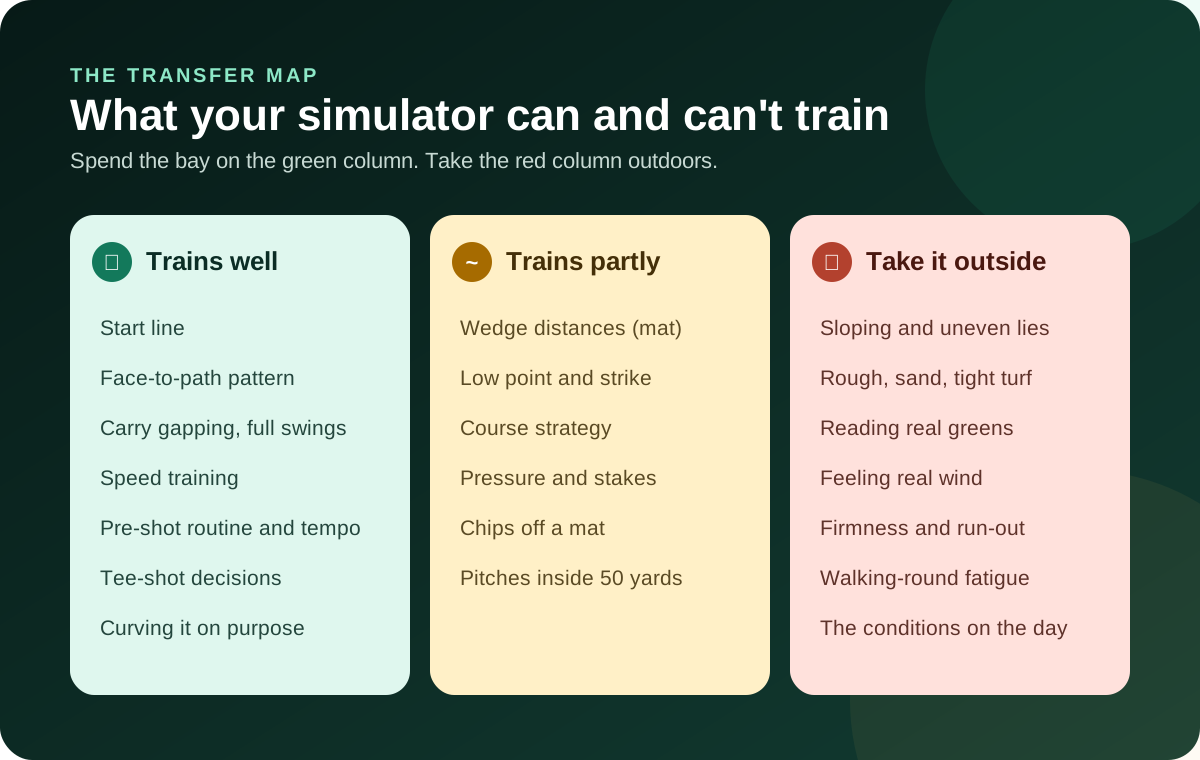
Green: where the simulator is the best practice tool you own
- Start line and face control. Launch direction is among the most trustworthy numbers, and start line is the foundation of every shot shape. Practise it hard.
- Face-to-path patterns. If you slice, the bay shows you exactly why after every swing, which no range can. Just remember that indoors, curve is partly calculated from club data.
- Full-swing gapping. You can map every club's carry in an hour. Confirm the numbers outdoors, then use them to build a bag that fits your real distances.
- Speed training. Clubhead speed is measured reliably, so speed sessions indoors are honest.
- Routine and tee-shot decisions. You can rehearse a full pre-shot routine and choose targets on virtual holes as often as you like.
Amber: useful only if you add honest feedback
- Wedge distances and strike. Mats flatter wedges more than any other club. Add a towel or a strike-marking spray, as described in the mat practice guide, so a fat shot shows up as a fat shot.
- Short pitches. Inside about 50 yards, the screen's job is mostly to give you a target. Your feel for contact matters more than the reported carry.
- Strategy and pressure. Virtual holes let you practise picking targets, but only if you play by real rules. More on that below.
Red: the golf that only exists outdoors
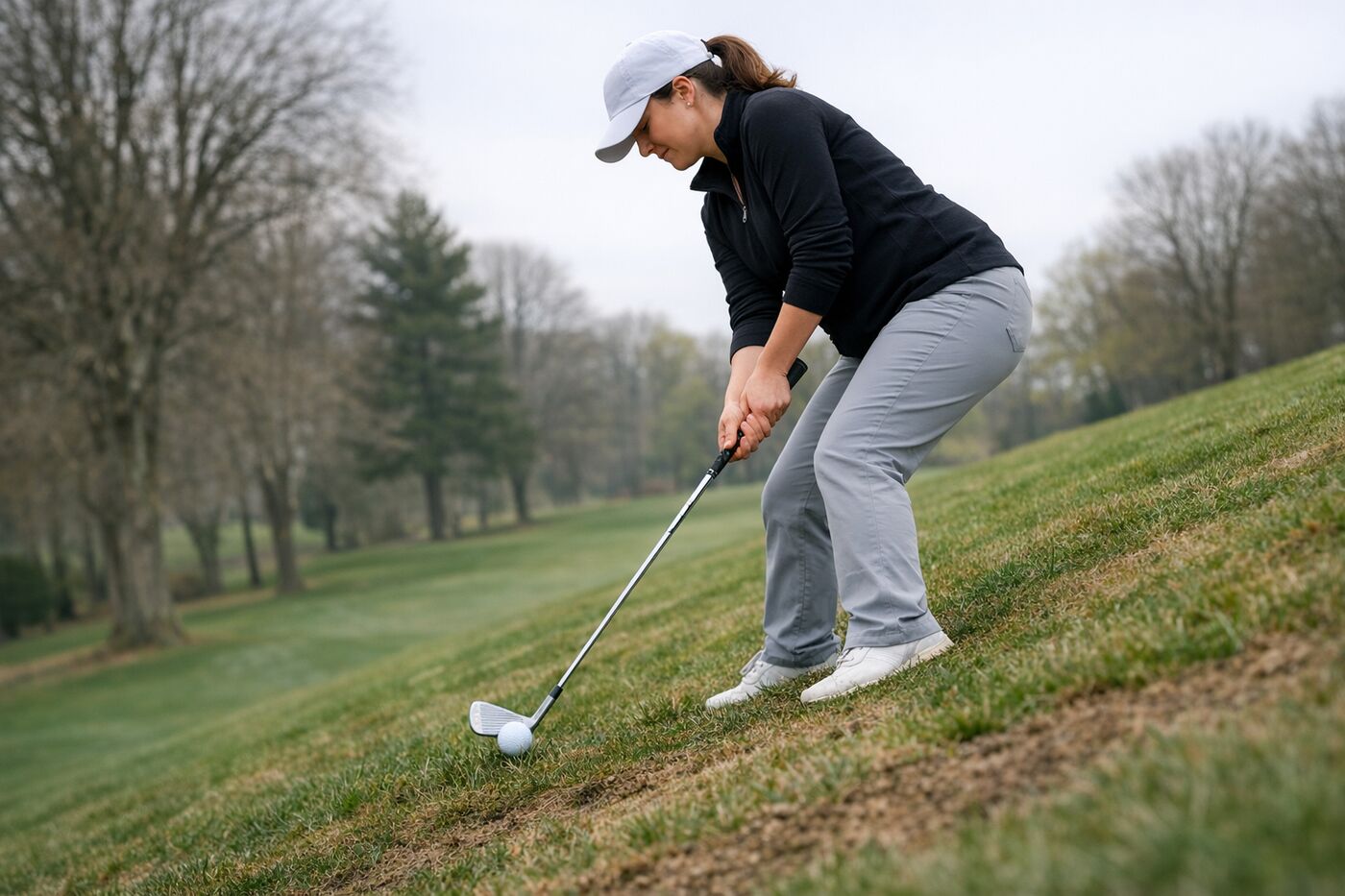
Sloping lies, rough, sand, tight turf, firm fairways that release, real wind, green reading, and swinging well on the 16th hole after a four-hour walk: none of these exist in a bay. Some software can simulate rough or wind as a number on the ball. It can't simulate what a ball below your feet does to your balance, or how wind feels on your face as you pick a club. Treat these as outdoor skills, and budget outdoor time for them on purpose.
Five principles that make indoor practice stick
The motor-learning research doesn't hand golfers a recipe, and we'll be clear about where it is thin. It does point consistently in a few directions.
1. Mix it up, but not before you're ready
Blocked practice means the same club, the same target, over and over. Random practice means a different club or target each shot. The trade-off between them is called contextual interference. Random practice usually feels worse and looks worse during the session, but it often produces better learning.
- In a putting study with novice golfers, the random group made more errors during practice but putted more accurately on a later retention test. They also developed a mental representation of the putt closer to that of skilled golfers.[11]
- Porter and Magill found that golfers who moved from blocked, to a fixed rotation, to fully random practice retained putting skill better than those who used blocked or random practice alone.[12]
Here is the honest caveat. A 2024 meta-analysis found random practice helped transfer by a medium amount overall, and the effect was strong in laboratory studies. In applied, real-world settings it was smaller and not statistically significant.[13] So random practice is a sound default, not magic. The progression is what we'd bet on: block a new move until you understand it, then randomise to test whether you own it.
That matches Guadagnoli and Lee's challenge point framework: the best practice difficulty depends on the player and the task.[14] A beginner learning to make contact needs more repetition. A 6-handicap tuning a wedge needs more variety and consequence.
2. Make the bay look like the decision, not just the swing
Sport scientists call this representative learning design. Practice should preserve the information and decisions of the real performance setting, not just the movement.[15] On the course, you never hit the same shot twice in a row. You read a lie, pick a target, choose a club, run a routine and commit. If your indoor session never asks you to do those things, it trains a swing without training golf.
In a bay, that means changing the hole, the club and the target on every ball during the transfer part of your session, and going through your full routine as if there were a scorecard in your pocket.
3. Don't let the screen think for you
A launch monitor gives you more feedback than any golfer in history had. That is a mixed blessing. Classic motor-learning research found that reducing how often learners get results feedback can improve learning.[16] The explanation is the guidance hypothesis: feedback given too often can create dependence and block your own sense of what happened.[17]
On the course there is no screen. The skill you need is knowing, before the ball lands, roughly what you just did.
Before you look at the screen, say out loud (or jot down) your prediction: "Started right, slight draw, a bit thin, about 150." Then look. TrackMan's coaching team recommends exactly this kind of prediction to build a link between feel and real outcomes.[3] Do it for a block of ten balls and count how many predictions were close. That count is a skill, and it travels to the course with you. Some golfers go further and switch the data display off for a set of shots, checking only the summary afterwards.
4. Point your attention at the ball and the target
In a study of golf pitch shots, golfers who focused on the club's swing (an external focus) were more accurate than those who focused on their arms (an internal focus). This held for novices and for low-handicap players.[18] Indoors, it's tempting to fixate on body positions because the data invites constant tinkering. Keep technical work in the "build" block. When you're testing transfer, think about the target and the ball's flight, the same as you will on the first tee.
5. Add a consequence, especially late in the session
Pressure changes performance, and the research suggests you can practise for it. In putting and climbing experiments, people who practised under anxiety performed better when tested under anxiety. The benefit was strongest when the pressure came in the second half of practice.[19] The same study found that practising anxious didn't help a calm performance, which is a good argument for doing both.
In a bay, a consequence can be simple: a score you write down and try to beat next week, a small stake with a friend, or a rule that a miss sends you back to the start of a ladder.
A 45-minute simulator session that transfers
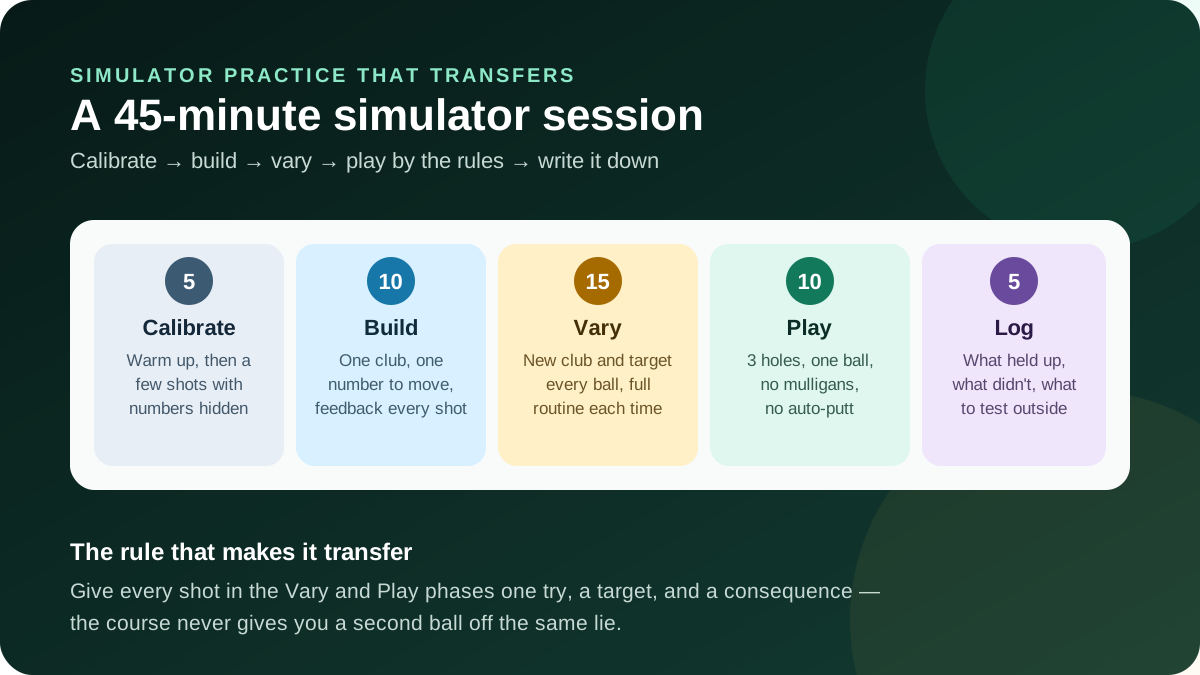
This is the indoor cousin of our 60-minute range session, adapted to what a bay does well.
| Phase | Time | What to do | Why it transfers |
|---|---|---|---|
| Calibrate | 5 min | Dynamic warm-up, then 8–10 easy shots. Hide the numbers for the last few and predict each one. | Warms up your body and your feel before the data takes over. |
| Build | 10 min | One club, one number you're trying to move (face-to-path, start line, launch). Feedback every shot. | Blocked work is the right tool for understanding a change. |
| Vary | 15 min | A new club and a new target every ball. Full routine each time. Check the numbers on every second or third shot, not every one. | Rebuilds the decide-and-commit loop the course demands. |
| Play | 10 min | Three holes on a course you know or will play. One ball. No mulligans, no gimmes, no auto-putt. | Adds consequence late in the session, when it helps most. |
| Log | 5 min | Write down what held up, what didn't, and one thing to test outdoors. | Turns a session into a thread you can follow outside. |
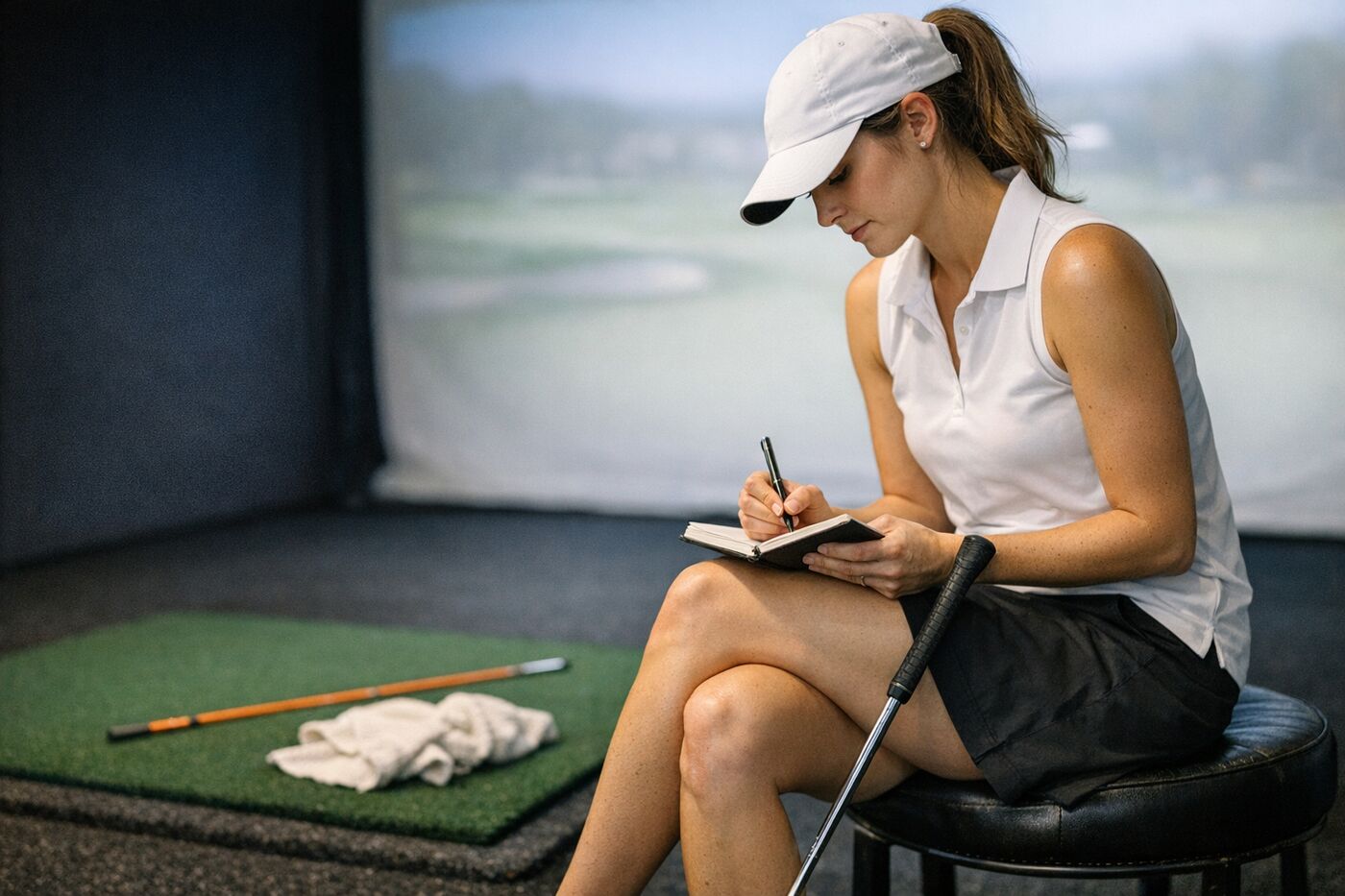
Eight simulator drills built for the course
1. The first-tee rehearsal
Pick the opening hole of your home course. Go through your full routine and hit one tee shot. Walk away from the mat, have a drink, and come back cold for another. Five attempts, each one "the first shot of the day". You're training the one swing you can't warm into on the course.
2. The start-line gate
Choose a start-line window (say, within 2° of your target line) and hit ten balls with a mid-iron. Count how many start inside it. Then do it with the driver. Start line is the number the screen measures best and the course punishes most.
3. Carry ladder with a miss rule
Set wedge targets at three distances you face often. Hit one ball to each, from shortest to longest. A shot outside your tolerance (try 5 yards for wedges) sends you back to the first rung. It's simple, uncomfortable and a lot like a round.
4. The predict-then-reveal block
Ten shots with the display hidden. Write each prediction: start direction, curve, strike, rough carry. Reveal the summary at the end and score yourself. Over a winter, your hit rate on predictions is one of the best signs that indoor work will hold up outdoors.
5. The 150–200 yard rotation
Mark Broadie's strokes-gained research found that shots from 150–200 yards had the strongest link to total strokes gained on the PGA Tour.[20] For amateurs, he found that approach shots account for about four of the ten strokes separating a 90-shooter from an 80-shooter.[21] Shot Scope data shows 5-handicaps hitting greens from 150–175 yards 34% of the time against 19% for 15-handicaps.[22] This zone is where a simulator earns its keep. Rotate clubs and targets between 150 and 200 yards and track proximity, not just carry.
6. Shape on demand
Call the shape before every swing: draw, fade or straight. Score one point for the right start side and one for the right curve. It trains face and path control in the way you'll use it, to a target, not as a position in a swing video.
7. The honest-strike wedge set
Lay a towel a few inches behind the ball (the mat guide explains the setup) and hit twenty wedges of varying length. A shot that touches the towel counts as a miss however it looks on screen. This is how you train the low-point control the mat otherwise hides.
8. The three-hole stake
Finish every session with three holes under strict rules: one ball, real putting, no gimmes, play the tees you actually play. Record the score. Next session, try to beat it. A small consequence late in practice is what the anxiety research suggests helps most.[19]
Simulator settings that quietly inflate your game
Simulator software is built to be fun, and fun settings are often the opposite of honest ones. Exact menu names vary between programs, so check yours for these:
| Setting | Fun default | Transfer setting |
|---|---|---|
| Mulligans | On | Off. The course gives you one ball. |
| Gimmes and auto-putt | Generous or automatic | Off, or the shortest gimme you'd accept in a real match. |
| Green speed and firmness | Software default | As close as possible to the course you play most. |
| Altitude and temperature | Sea level, warm | Your home course's elevation and typical playing temperature. |
| Ball type | Premium ball assumed | Match the ball you play outdoors, if the software allows it. |
| Wind | Calm | Calm for building. Add realistic wind for the "Play" phase. |
| Tees | Whatever is loaded | The tees you actually play. |
Myth: "I'm shooting 78 on the simulator, so I'm ready to break 80."
Reality: A score built on perfect lies, normalised weather, a forgiving mat and generous putting describes your ball-striking in ideal conditions. That is worth knowing, but it isn't a handicap. Many golfers find their indoor scores and outdoor scores tell different stories. The gap between them is useful information about which red-column skills need outdoor time.
Putting and the short game: be honest about the limits

We looked for independent research on how accurately simulators model putting and could not find any we would stand behind. That isn't proof that simulator putting is bad. It means nobody has shown that it's good. Indoor putting surfaces have their own speed, real greens vary, and reading break on a screen is a different skill from reading it with your feet.
Putting still matters for the scorecard. In Broadie's research, golfers who average 90 three-putt about 2.3 times a round, against roughly half a three-putt for tour pros.[20] The answer is to put putting where it can be practised honestly:
- Indoors: start line and stroke on a flat putting mat or carpet, with a gate or a coin as the target. These transfer because they don't depend on the surface.
- Outdoors: speed control and reading on real greens. Lag putting from 20–40 feet is the highest-value outdoor short-game session for many golfers.
- In the simulator: play putts out for honesty in the "Play" phase, but don't calibrate your feel for speed from the screen.
The same logic applies to chips. A bay can give you a target and a carry number. It can't give you a tight lie, a fluffy lie or a downhill one. Treat indoor chipping as rehearsing contact and landing spot, and do your around-the-green work on grass.

Simulator practice vs. just playing rounds
This is the question behind the question: if you have two hours, should you practise in the bay or go play (indoors or out)? The honest answer is that they do different jobs.
| Focused simulator practice | Simulator round | Outdoor round | |
|---|---|---|---|
| Reps of any single shot | High, and you choose which | Low: one of each shot as the course offers it | Low, plus lots of walking and waiting |
| Feedback | Detailed, every shot if you want it | Detailed but easy to ignore | Only what you see and feel |
| Decision-making | Only if you build it in | Good: real holes, real choices | Best: lies, wind, conditions |
| Pressure | Only if you add it | Moderate with honest settings | Real |
| Lies, turf, greens | None | Simulated or absent | All of it |
| Best for | Building a change, gapping, speed | Testing a change under light consequence; fun | Proving it, and the skills only grass teaches |
Here is what we see when golfers reason through it. If something specific is broken (a slice, a wedge gap, a start line that wanders), a focused session builds it faster than a round, because a round gives you only a handful of attempts at that shot. If the swing is in decent shape but scores don't follow, playing more, especially outdoors, is usually the better use of time, because the missing skills are decisions, lies and pressure. And if golf is your social outlet and the simulator is where your friends are, a sim round with honest settings is a perfectly good evening of golf. Not every hour has to be optimised.
Sample weekly mixes
| Your situation | A reasonable mix |
|---|---|
| Winter, no outdoor golf at all | Two 45-minute focused sessions, one honest sim round, and a few minutes of putting on carpet most days. |
| In season, one round a week | One focused session targeting what the last round exposed, plus the round. Keep short-game and putting practice outdoors. |
| Time-poor, golfing in calendar gaps | Short sessions, 20–30 minutes: build and vary, then log. Rounds whenever you can get them. |
| Preparing for an event | Shift toward "Play": holes from the event course if your software has it, full routine, strict settings. Do the final week of short-game prep on grass. |
None of these are prescriptions. They are starting points to adjust for your goals, your body and your calendar.
Your body on a mat: practise volume with care
Hand and wrist injuries are the most common upper-limb injuries in elite golfers, and about two-thirds of wrist injuries are on the lead side. Contributing factors in the medical literature include hitting the ground, swing mechanics and excessive practice.[23] We could not find a peer-reviewed study that directly measures impact forces on mats versus grass. But physical therapists who treat golfers report seeing more wrist and hand problems in the off-season, when golfers move from grass to mats. They recommend fewer full swings, alternating clubs, and a full routine between shots.[24]
That advice happens to be good practice design anyway. A routine between every shot slows you down, varies the task, and cuts the ball count. Sports medicine reviews also recommend a warm-up before every practice or round.[25] It is easy to skip indoors when the mat is ten steps from your kitchen.
If you're working on a change, quality falls off well before your body tells you to stop. When your setup gets lazy or you start raking balls without a routine, end the full-swing work and move to putting, or stop. Fifty deliberate swings are usually worth more than 200 hurried ones, for your learning and for your lead wrist.
Coming back outside: a four-week bridge
The first outdoor weeks after a simulator season are where transfer is won or lost. Expect lower launch and more spin on lofted clubs (the TrackMan mat test again[9]), and expect turf to expose any low-point drift the mat forgave. Physical therapist Hope Whitman suggests rebuilding in stages: contact work on grass first, then varied targets and uneven lies, then on-course sessions focused on decisions.[26] Here is how we'd lay it out:
| Week | Focus | What to do |
|---|---|---|
| 1 | Contact and low point | Short irons and wedges off grass. Watch your divots: where they start and how deep they are. Re-check wedge carries. |
| 2 | Recalibrate your numbers | Hit each club on grass and compare to your indoor carries. Update your yardages: these become your course numbers. |
| 3 | Lies and variety | Sloping lies, rough and tight lies around the practice green. Lag putting on real greens. |
| 4 | Play with intent | Rounds, or on-course practice holes, focused on decisions and committing. Note which indoor gains held up. |
If you're coming back after a full winter, the same idea applies to your body as well as your swing: build up gradually, and judge the early weeks by contact and decisions, not score.
Connecting the bay to the course
The biggest reason indoor practice fails to transfer isn't the mat or the software. It's that the simulator session and the round live in different places. One is in a launch-monitor app, the other on a scorecard, and nobody connects them. The golfer who fixed his slice indoors needed someone to notice that his alignment, not his swing, was what came back on the course.[3]
This is the gap GolfSalt was built for. Your coach can read exports from most common launch monitors and simulators and set those sessions alongside your rounds, your clubs and your goals. It can notice, for example, that your indoor 8-iron gaps are clean while your outdoor approaches from the same distance keep finishing short. The next practice plan then reflects what actually happened on the course, not just in the bay. You don't need a simulator to get value from coaching, and if you have one, it's one source of evidence among several. If you want the details, the launch monitor coaching page explains how session data fits in.
Final thought
A simulator is the most honest practice tool most golfers will ever own, about the things it can see. It will tell you exactly where the ball started, how fast you swung and whether the face was open to the path. It is generous about everything else: the lie, the turf, the weather, the green, the second ball.
Practice transfers when you use the bay for what it sees, add back the consequences the course will impose, and take the rest outside on purpose. Make predictions before you look. Change the target every ball. Play the putts out. Write down what held up. Then, when the season turns, test it on grass and update your numbers.
Do that, and the swing you built in February has a much better chance of showing up on the first tee in April.
Sources & References
- National Golf Foundation. "The Golf Simulator Opportunity" (white paper). April 2025. ngf.org
- National Golf Foundation. "Golf Industry Research" (2025 participation). ngf.org
- Arnott, P. with Bergdahl, N. "Trackman Talks: Build practice that transfers." TrackMan, April 2026. trackman.com
- Trackman Editorial Team. "What is Spin Axis?" TrackMan, September 2024. trackman.com
- Foresight Sports. "Foresight Sports vs Trackman: Learning the Key Differences." April 2025 (manufacturer content). foresightsports.com
- Bishop, C. et al. "Trackman 4: Within and between-session reliability and inter-relationships of launch monitor metrics during indoor testing in high-level golfers." Journal of Sports Sciences 41(23):2138–2143. doi.org/10.1080/02640414.2024.2314864
- Leach, R.J., Forrester, S.E., Mears, A.C. & Roberts, J.R. "How valid and accurate are measurements of golf impact parameters obtained using commercially available radar and stereoscopic optical launch monitors?" Measurement 112:125–136, 2017. doi.org/10.1016/j.measurement.2017.08.009
- Trackman Editorial Team. "The Normalization feature explained." TrackMan, 2014. trackman.com
- Johnson, R. & Mathewson, G. "Mats VS Grass – What's the Difference?" TrackMan blog, c. 2014 (archived). web.archive.org
- Arccos Golf. "Know Your Distance Numbers: Indoor vs Outdoor." February 2023. arccosgolf.com
- Fazeli, D., Taheri, H. & Saberi Kakhki, A. "Random Versus Blocked Practice to Enhance Mental Representation in Golf Putting." Perceptual and Motor Skills, 2017. doi.org/10.1177/0031512517704106
- Porter, J.M. & Magill, R.A. "Systematically increasing contextual interference is beneficial for learning sport skills." Journal of Sports Sciences 28(12):1277–1285, 2010. doi.org/10.1080/02640414.2010.502946
- Czyż, S.H., Wójcik, A.M. & Solarská, P. "The effect of contextual interference on transfer in motor learning: a systematic review and meta-analysis." Frontiers in Psychology 15:1377122, 2024. frontiersin.org
- Guadagnoli, M.A. & Lee, T.D. "Challenge point: a framework for conceptualizing the effects of various practice conditions in motor learning." Journal of Motor Behavior 36(2):212–224, 2004. pubmed.ncbi.nlm.nih.gov
- Pinder, R.A., Davids, K., Renshaw, I. & Araújo, D. "Representative learning design and functionality of research and practice in sport." Journal of Sport and Exercise Psychology 33(1):146–155, 2011. doi.org/10.1123/jsep.33.1.146
- Winstein, C.J. & Schmidt, R.A. "Reduced frequency of knowledge of results enhances motor skill learning." Journal of Experimental Psychology: Learning, Memory, and Cognition 16(4):677–691, 1990. doi.org/10.1037/0278-7393.16.4.677
- Chiviacowsky, S. et al. "Reduced frequency of knowledge of results enhances learning in persons with Parkinson's disease." Frontiers in Psychology 1:226, 2010. frontiersin.org
- Wulf, G. & Su, J. "An external focus of attention enhances golf shot accuracy in beginners and experts." Research Quarterly for Exercise and Sport 78(4):384–389, 2007. unlv.edu (PDF)
- Lawrence, G.P. et al. "Practice with anxiety improves performance, but only when anxious: evidence for the specificity of practice hypothesis." Psychological Research, 2014. doi.org/10.1007/s00426-013-0521-9
- Broadie, M. "Assessing Golfer Performance on the PGA TOUR." Interfaces 42(2):146–165, 2012. columbia.edu (PDF)
- Broadie, M. "Improving your approach shots is the fastest way to lower scores." GOLF.com, January 2015. golf.com
- Elliott, B. "Why 150 to 200 Yards Costs 15-Handicappers So Many Shots" (Shot Scope data). GolfLink, 2026. golflink.com
- Robinson, P. et al. "Golf Injuries." Aspetar Sports Medicine Journal, 2023. aspetar.com
- Roberts, W. (DPT). "Hitting Off Mats This Off-Season? Do It With Caution." Central Links Golf, December 2022. centrallinksgolf.org
- Creighton, A., Cheng, J. & Press, J. "Upper Body Injuries in Golfers." Current Reviews in Musculoskeletal Medicine, 2022. doi.org/10.1007/s12178-022-09787-y
- Whitman, H. (PT, DPT). "From Simulator to Fairway: A PT's Guide to Transitioning from Indoor to Outdoor Golf." MEND Colorado, April 2026. mendcolorado.com